
Pricing
Pricing information has not been added yet.
Overview
Vibe Kanban is an open-source project-management interface built for coordinating AI coding agents and development tasks. It applies a familiar kanban-style workflow to agentic software development, giving users a visual place to organize work and oversee multiple coding tasks instead of managing everything through isolated terminal sessions.
The project is designed around the reality that developers may run several AI agents or workstreams in parallel. A board-based interface makes it easier to see task state, move work through stages, review what agents are doing, and keep autonomous coding activity connected to a broader development plan.
Vibe Kanban is useful for teams and individual developers adopting coding agents for substantial project work. It adds an orchestration and visibility layer above the agents themselves, helping users manage parallel tasks, maintain context about progress, and treat AI-driven implementation as a trackable engineering workflow rather than a collection of disconnected chats.
README

Get 10X more out of Claude Code, Gemini CLI, Codex, Amp and other coding agents...


Vibe Kanban is sunsetting. Read the announcement.
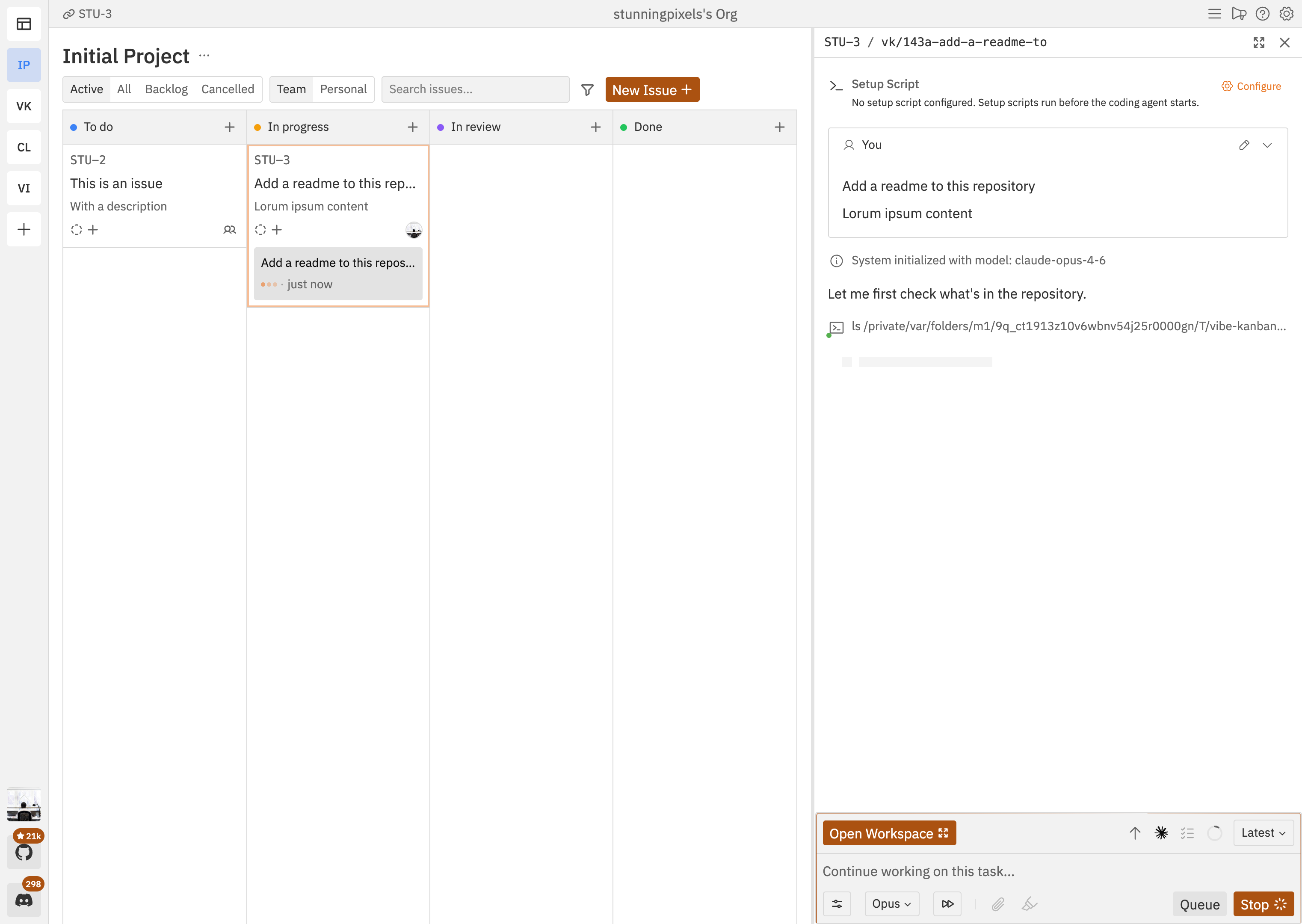
Overview
In a world where software engineers spend most of their time planning and reviewing coding agents, the most impactful way to ship more is to get faster at planning and review.
Vibe Kanban is built for this. Use kanban issues to plan work, either privately or with your team. When you're ready to begin, create workspaces where coding agents can execute.
- Plan with kanban issues — create, prioritise, and assign issues on a kanban board
- Run coding agents in workspaces — each workspace gives an agent a branch, a terminal, and a dev server
- Review diffs and leave inline comments — send feedback directly to the agent without leaving the UI
- Preview your app — built-in browser with devtools, inspect mode, and device emulation
- Switch between 10+ coding agents — Claude Code, Codex, Gemini CLI, GitHub Copilot, Amp, Cursor, OpenCode, Droid, CCR, and Qwen Code
- Create pull requests and merge — open PRs with AI-generated descriptions, review on GitHub, and merge
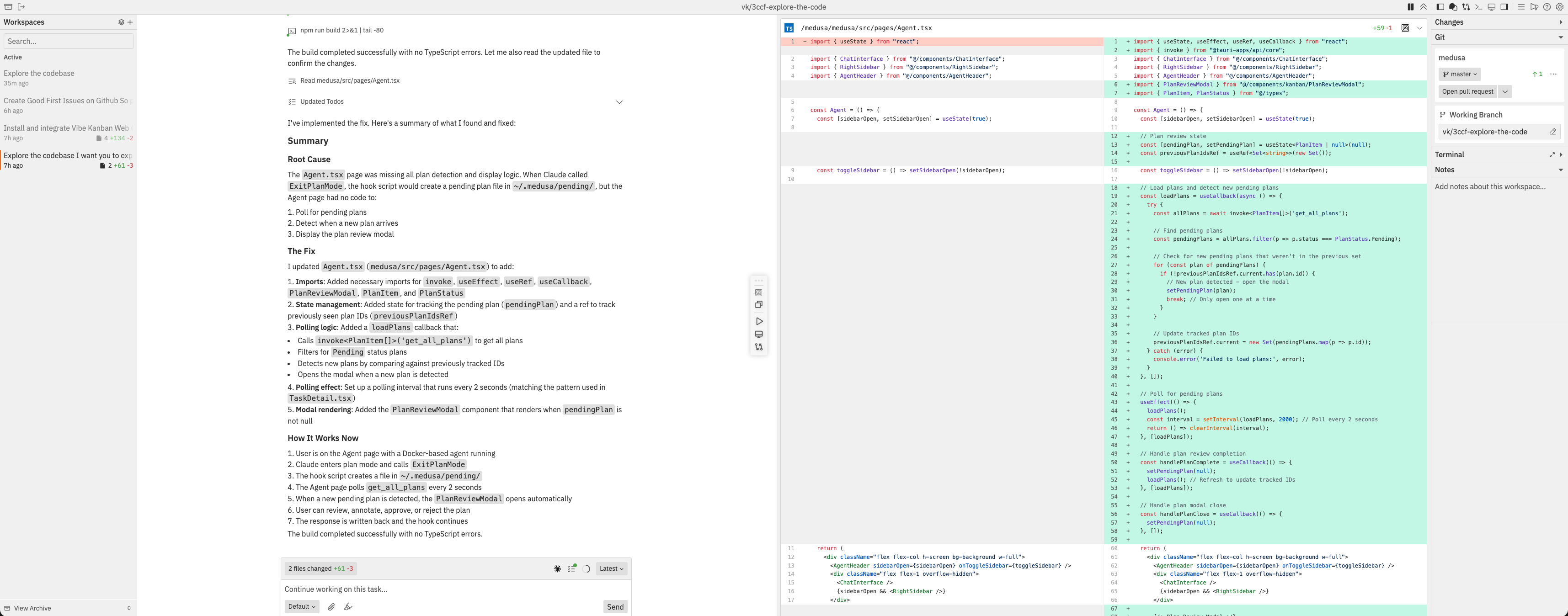
One command. Describe the work, review the diff, ship it.
npx vibe-kanban
Installation
Make sure you have authenticated with your favourite coding agent. A full list of supported coding agents can be found in the docs. Then in your terminal run:
npx vibe-kanban
Documentation
Head to the website for the latest documentation and user guides.
Self-Hosting
Want to host your own Vibe Kanban Cloud instance? See our self-hosting guide.
Support
We use GitHub Discussions for feature requests. Please open a discussion to create a feature request. For bugs please open an issue on this repo.
Contributing
We would prefer that ideas and changes are first raised with the core team via GitHub Discussions or Discord, where we can discuss implementation details and alignment with the existing roadmap. Please do not open PRs without first discussing your proposal with the team.
Development
Prerequisites
Additional development tools:
cargo install cargo-watch
cargo install sqlx-cli
Install dependencies:
pnpm i
Running the dev server
pnpm run dev
This will start the backend and web app. A blank DB will be copied from the dev_assets_seed folder.
Building the web app
To build just the web app:
cd packages/local-web
pnpm run build
Build from source (macOS)
- Run
./local-build.sh - Test with
cd npx-cli && node bin/cli.js
Environment Variables
The following environment variables can be configured at build time or runtime:
| Variable | Type | Default | Description |
|---|---|---|---|
POSTHOG_API_KEY | Build-time | Empty | PostHog analytics API key (disables analytics if empty) |
POSTHOG_API_ENDPOINT | Build-time | Empty | PostHog analytics endpoint (disables analytics if empty) |
PORT | Runtime | Auto-assign | Production: Server port. Dev: Frontend port (backend uses PORT+1) |
BACKEND_PORT | Runtime | 0 (auto-assign) | Backend server port (dev mode only, overrides PORT+1) |
FRONTEND_PORT | Runtime | 3000 | Frontend dev server port (dev mode only, overrides PORT) |
HOST | Runtime | 127.0.0.1 | Backend server host |
MCP_HOST | Runtime | Value of HOST | MCP server connection host (use 127.0.0.1 when HOST=0.0.0.0 on Windows) |
MCP_PORT | Runtime | Value of BACKEND_PORT | MCP server connection port |
DISABLE_WORKTREE_CLEANUP | Runtime | Not set | Disable all git worktree cleanup including orphan and expired workspace cleanup (for debugging) |
VK_ALLOWED_ORIGINS | Runtime | Not set | Comma-separated list of origins that are allowed to make backend API requests (e.g., https://my-vibekanban-frontend.com) |
VK_SHARED_API_BASE | Runtime | Not set | Base URL for the remote/cloud API used by the local desktop app |
VK_SHARED_RELAY_API_BASE | Runtime | Not set | Base URL for the relay API used by tunnel-mode connections |
VK_TUNNEL | Runtime | Not set | Enable relay tunnel mode when set (requires relay API base URL) |
Build-time variables must be set when running pnpm run build. Runtime variables are read when the application starts.
Self-Hosting with a Reverse Proxy or Custom Domain
When running Vibe Kanban behind a reverse proxy (e.g., nginx, Caddy, Traefik) or on a custom domain, you must set the VK_ALLOWED_ORIGINS environment variable. Without this, the browser's Origin header won't match the backend's expected host, and API requests will be rejected with a 403 Forbidden error.
Set it to the full origin URL(s) where your frontend is accessible:
# Single origin
VK_ALLOWED_ORIGINS=https://vk.example.com

# Multiple origins (comma-separated)
VK_ALLOWED_ORIGINS=https://vk.example.com,https://vk-staging.example.com
Remote Deployment
When running Vibe Kanban on a remote server (e.g., via systemctl, Docker, or cloud hosting), you can configure your editor to open projects via SSH:
- Access via tunnel: Use Cloudflare Tunnel, ngrok, or similar to expose the web UI
- Configure remote SSH in Settings → Editor Integration:
- Set Remote SSH Host to your server hostname or IP
- Set Remote SSH User to your SSH username (optional)
- Prerequisites:
- SSH access from your local machine to the remote server
- SSH keys configured (passwordless authentication)
- VSCode Remote-SSH extension
When configured, the "Open in VSCode" buttons will generate URLs like vscode://vscode-remote/ssh-remote+user@host/path that open your local editor and connect to the remote server.
See the documentation for detailed setup instructions.
Releases
Release information has not been added yet.
Related articles
Guides and news that mention this tool.

AI Agents in Zapier vs Make vs n8n: Which Is Best?
What Is n8n? The Open-Source Workflow Automation Tool Explained
AI Email Labeling in Gmail with OpenAI
AI WhatsApp Customer Support Agent

Build a RAG Chatbot over Your Google Drive Documents

Build an AI Assistant on Telegram (Voice + Text) with n8n
Complete your AI stack
Add a general assistant, research, coding, monitoring, and team productivity to your automations.


Best alternatives
Compare similar tools in the same category.



