
Pricing
Pricing information has not been added yet.
Overview
Taste Skill is an open-source collection of design-oriented skills for AI coding agents, focused on producing more polished and intentional frontend interfaces. The default skill guides an agent to infer a project’s visual language, control layout variation, motion, and density, and follow stricter design and implementation rules instead of generating generic AI-style UI. Additional skills cover image-to-code workflows, redesigning existing projects, high-end visual design, and variants tuned for different agent models.
The skills can be installed into compatible agent environments or copied directly into conversations and repositories. Some produce implementation code, while others generate visual references that can then be handed to coding agents such as Codex, Cursor, or Claude Code. Taste Skill is particularly useful for developers who rely on AI for frontend work but want stronger art direction, consistency, and design-system thinking than a default coding prompt typically provides.
README
Taste Skill
The Anti-Slop Frontend Framework for AI Agents

Sponsors
 Novamira · Full WordPress access for AI agents
 | IMG.LY · CreativeEditor SDK |
 | Emil Kowalski · animations.dev |
 | Sent.dm · messaging APIs for SMS, WhatsApp, and RCS |
 |  |
Portable Agent Skills that upgrade AI-built interfaces: stronger layout, typography, motion, and spacing instead of boilerplate-looking UIs. This repo also includes image-generation skills for reference boards (web, mobile, brand kits). Pair them with ChatGPT Images or similar generators, then hand the frames to Codex, Cursor, or Claude Code for implementation.
Disclaimer
Taste Skill has no official token, coin, or crypto project. Any token using my name, image, or project is unaffiliated and not endorsed by me.
Disclaimer · Install · Skills · Settings · Examples · Sponsors · Research · FAQ · License
Feedback & Contributions
We would love your feedback. Suggestions and bug reports:
- Open a Pull Request or Issue on GitHub
- DM @lexnlin or @blueemi99
- Email us at hello@tasteskill.dev
Installing
The npx skills add CLI scans the skills/ folder in this repo, so all skills below (code and image-generation) install the same way.
npx skills add https://github.com/Leonxlnx/taste-skill
Install a single skill by its install name (the name: field inside the SKILL frontmatter, not the folder name):
npx skills add https://github.com/Leonxlnx/taste-skill --skill "design-taste-frontend"
You can also copy any SKILL.md into your project or paste it into ChatGPT / Codex conversations.
Updating from the previous version
The default taste-skill (install name design-taste-frontend) is now v2 (experimental), a substantial rewrite of the original v1. If you already have v1 installed, just re-run the install command and you will be upgraded:
npx skills add https://github.com/Leonxlnx/taste-skill --skill "design-taste-frontend"
The install name did not change, so no script updates are needed. The newer SKILL.md replaces the older one in place.
If you depend on the exact behavior of v1 and want to pin to it explicitly:
npx skills add https://github.com/Leonxlnx/taste-skill --skill "design-taste-frontend-v1"
See CHANGELOG.md for the full v1 to v2 diff and the rationale.
Skills
Each skill does one job; you do not need all of them at once. Implementation skills output code. Image-generation skills output reference images only.
The Install name column is the exact value you pass to --skill.
| Skill (folder) | Install name | Description |
|---|---|---|
| taste-skill | design-taste-frontend | 🆕 v2 (experimental) - substantial rewrite of the default skill. Reads the brief, infers the design language, tunes three dials (VARIANCE / MOTION / DENSITY). Brief inference, design-system map, hard em-dash ban, canonical GSAP code skeletons, redesign-audit protocol, strict pre-flight check. Actively iterating toward v2.0.0 stable. |
| taste-skill-v1 | design-taste-frontend-v1 | The original v1 of taste-skill, preserved for projects depending on its exact behavior. Use only if the v2 default breaks something specific in your workflow. |
| gpt-tasteskill | gpt-taste | Stricter variant for GPT/Codex: higher layout variance, stronger GSAP direction, aggressive anti-slop. |
| image-to-code-skill | image-to-code | Image-first pipeline: generate site references, analyze them, then implement the frontend to match. |
| redesign-skill | redesign-existing-projects | Existing projects: audit the UI first, then fix layout, spacing, hierarchy, styling. |
| soft-skill | high-end-visual-design | Polished, calm, expensive UI with softer contrast, whitespace, premium fonts, spring motion. |
| output-skill | full-output-enforcement | When the model ships half-finished work: full output, no placeholder comments. |
| minimalist-skill | minimalist-ui | Editorial product UI (Notion/Linear vibes), restrained palette, crisp structure. |
| brutalist-skill | industrial-brutalist-ui | Hard mechanical language: Swiss type, sharp contrast, experimental layout. |
| stitch-skill | stitch-design-taste | Google Stitch-compatible rules, including optional DESIGN.md export format. |
Image generation skills
These produce design images only (no code). Use with ChatGPT Images, Codex image mode, or any agent that generates images.
| Skill (folder) | Install name | Description |
|---|---|---|
| imagegen-frontend-web | imagegen-frontend-web | Website comps: hero, landing, multi-section with strong typography, spacing, anti-slop art direction. |
| imagegen-frontend-mobile | imagegen-frontend-mobile | Mobile screens and flows: iOS/Android/cross-platform, mockups, readable type, coherent sets. |
| brandkit | brandkit | Brand-kit boards: logo directions, palettes, type, identity applications across categories. |
Which one should I use?
- Start with taste-skill for the safest general default. (Now v2 experimental - see what changed in the CHANGELOG.)
- If you depend on the exact behavior of the original taste-skill, install taste-skill-v1 instead.
- Use gpt-taste when you want the stricter GPT/Codex-oriented rules and motion/layout enforcement.
- Use image-to-code-skill for image → analyze → code website workflows.
- Use redesign-skill to improve an existing codebase instead of greenfield styling.
- Add soft-skill, minimalist-skill, or brutalist-skill when the visual direction is already chosen.
- Add output-skill if the agent keeps truncating output.
- Use imagegen-frontend-web, imagegen-frontend-mobile, or brandkit when the deliverable is images (comps, flows, identity boards), then pass results to your coding agent.
Image-first tip
For image-to-code-skill, state the pipeline in the prompt, e.g.: follow the skill: generate images, then analyze, then code.
ChatGPT Images and Codex
Attach or paste imagegen-frontend-web, imagegen-frontend-mobile, or brandkit and ask for the frames you need, then feed the renders to Codex, Cursor, or Claude Code. Use image-to-code-skill when you want one workflow that both generates references and implements the site in code.
Settings (taste-skill only)
Numbers at the top of the file are 1-10 dials:
- DESIGN_VARIANCE: Layout experimentation (lower: centered/clean · higher: asymmetric/modern).
- MOTION_INTENSITY: Animation depth (lower: hover · higher: scroll/magnetic).
- VISUAL_DENSITY: Information per viewport (lower: spacious · higher: dense dashboards).
Examples
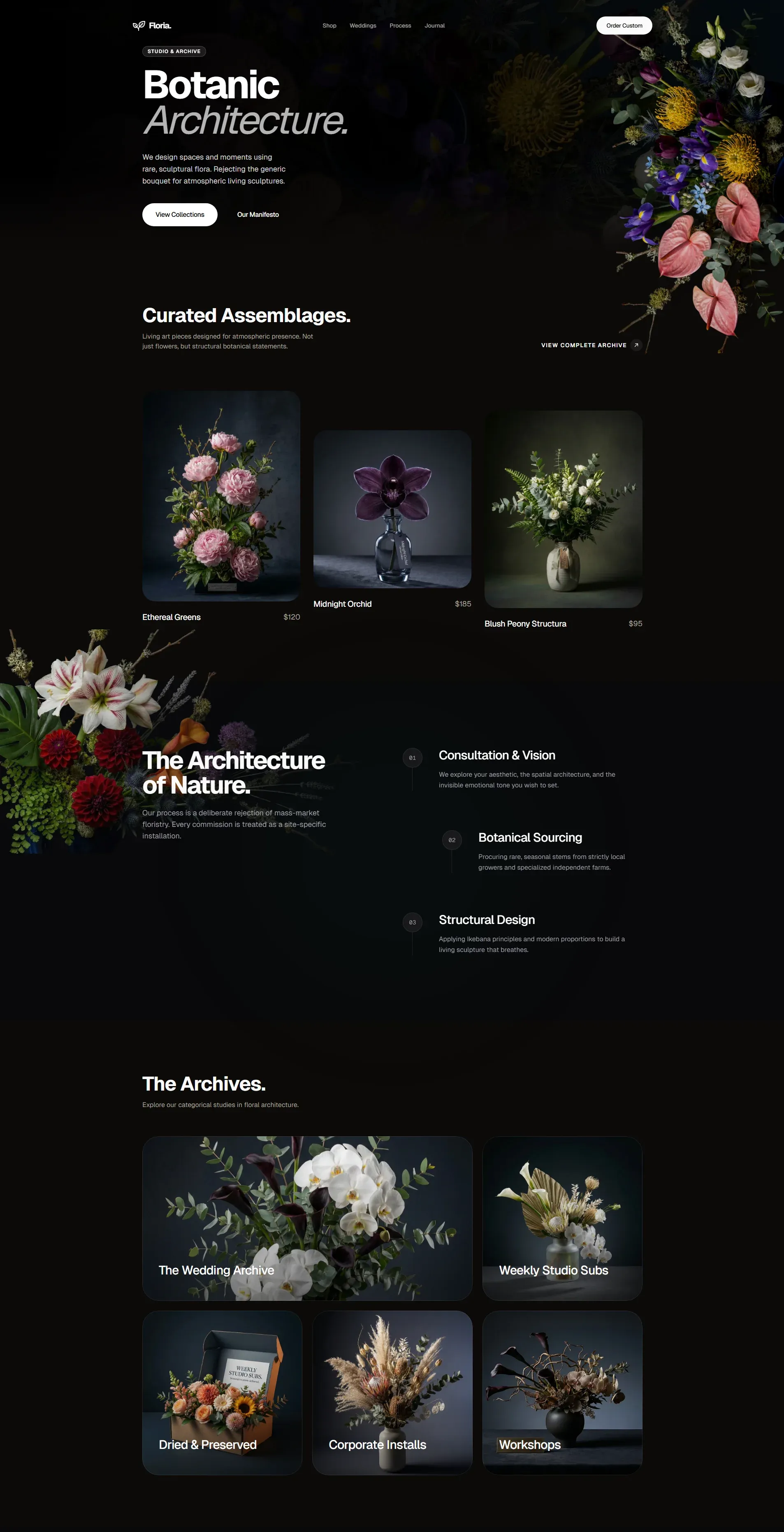
Created with taste-skill:
Support the project
If Taste Skill helps you, consider sponsoring:
Community Sponsors









Research
Background writing that shaped these skills lives in research/.
Common Questions
How is this different from other AI design skills?
Multiple specialized variants, adjustable dials in key skills, anti-repetition rules informed by dedicated research. All are framework agnostic across major coding agents.
Does it work with React, Vue, Svelte?
Yes. Rules target design intent, not a single framework API.
What is SKILL.md?
A portable instruction file agents can load automatically; install via npx skills add or by copying into a repo or conversation.
Do image-generation skills install with npx skills add?
Yes. They live under skills/ alongside the code skills so the same CLI discovers them.
License
MIT License · Copyright (c) 2026 Leonxlnx
Releases
Release information has not been added yet.
Complete your AI stack
Turn generated images into videos, articles, books, voiceovers, and automated content workflows.





Best alternatives
Compare similar tools in the same category.




