
Pricing
$0
Freemium
Overview
SeaTunnel is a multimodal, high-performance, distributed data integration tool, capable of synchronizing vast amounts of data daily. It's trusted by numerous companies for its efficiency and stability.
SeaTunnel addresses common data integration challenges.
README
Apache SeaTunnel





Overview
SeaTunnel is a multimodal, high-performance, distributed data integration tool, capable of synchronizing vast amounts of data daily. It's trusted by numerous companies for its efficiency and stability.
Why Choose SeaTunnel
SeaTunnel addresses common data integration challenges:
- Diverse Data Sources: Seamlessly integrates with hundreds of evolving data sources.
- Multimodal Data Integration: Supports the integration of video, images, binary files, structured and unstructured text data.
- Complex Synchronization Scenarios: Supports various synchronization methods, including real-time, CDC, and full database synchronization.
- Resource Efficiency: Minimizes computing resources and JDBC connections for real-time synchronization.
- Quality and Monitoring: Provides data quality and monitoring to prevent data loss or duplication.
Key Features
- Diverse Connectors: Offers support for over 160 connectors, with ongoing expansion.
- Batch-Stream Integration: Easily adaptable connectors simplify data integration management.
- Distributed Snapshot Algorithm: Ensures data consistency across synchronized data.
- Multi-Engine Support: Works with SeaTunnel Zeta Engine, Flink, and Spark.
- JDBC Multiplexing and Log Parsing: Efficiently synchronizes multi-tables and databases.
- High Throughput and Low Latency: Provides high-throughput data synchronization with low latency.
- Real-Time Monitoring: Offers detailed insights during synchronization.
SeaTunnel Workflow
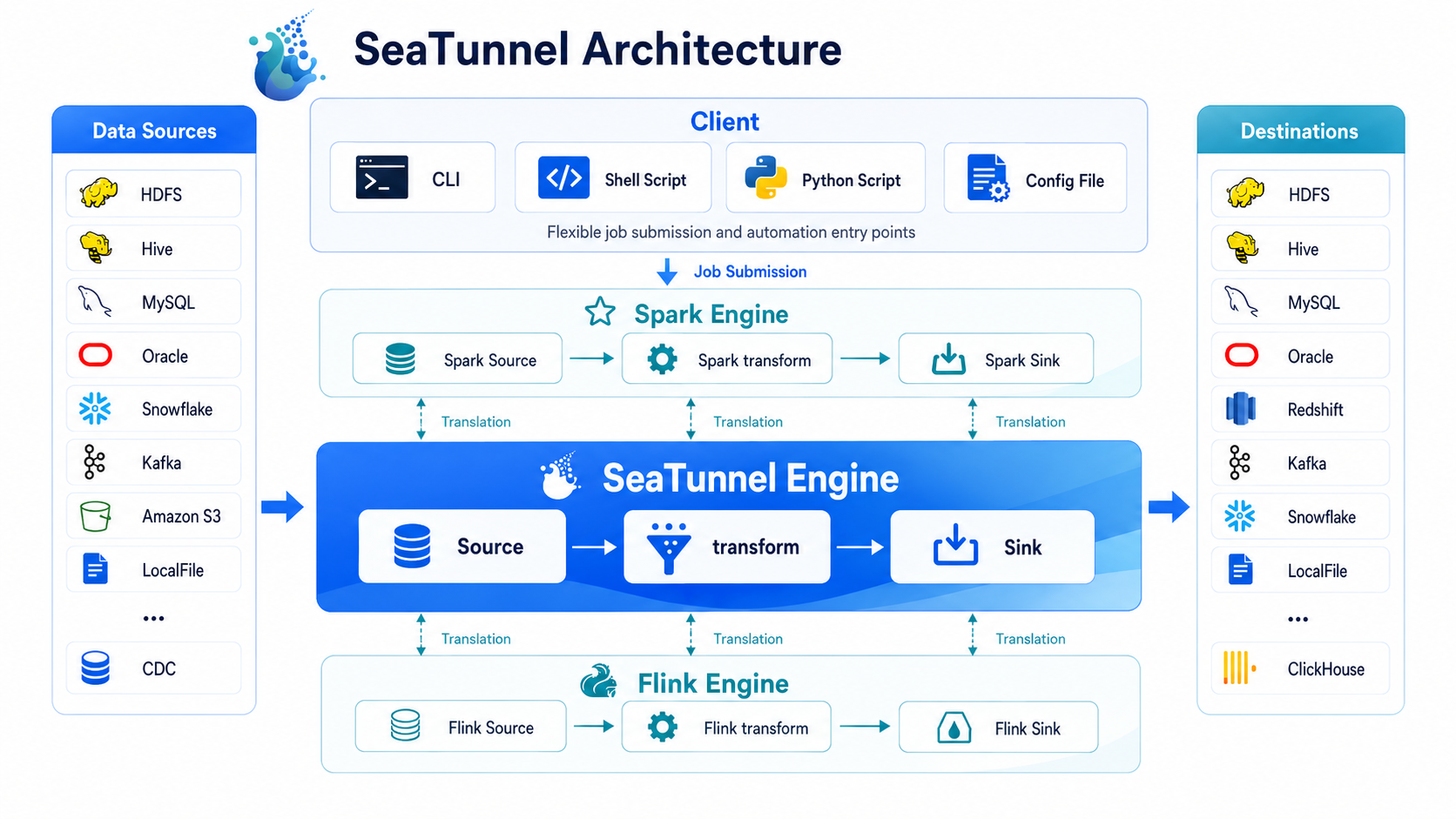
Configure jobs, select execution engines, and parallelize data using Source Connectors. Easily develop and extend connectors to meet your needs.
Supported Connectors
Getting Started
Download SeaTunnel from the Official Website. Choose your runtime execution engine:
Multimodal Data Integration
- Most data integration tools support structured and unstructured text data, and SeaTunnel does as well. Simply refer to the desired Source/Sink to use.
- For integrating video, images, and binary files with SeaTunnel, please refer to the documentation for detailed instructions.
Apache SeaTunnel Tools
SeaTunnel Tools provides a range of peripheral tools, including Apache SeaTunnel Mcp Server, etc, please refer to SeaTunnel Tools.
Users
Companies and organizations worldwide use SeaTunnel for research, production, and commercial products. Explore real-world use cases of SeaTunnel, such as JP morgan, S7, JDT, Bytedance, Tencent Cloud. More use cases can be found on the SeaTunnel Users.
Code of Conduct
Participate in this project in accordance with the Contributor Covenant Code of Conduct.
Contributors
We appreciate all developers for their contributions. See the List Of Contributors.
How to Compile
Refer to this Setup for compilation instructions.
Contact Us
- Mail list: dev@seatunnel.apache.org. Subscribe by sending an email to
dev-subscribe@seatunnel.apache.org. - Slack: Join SeaTunnel Slack
- Twitter: ASFSeaTunnel on Twitter
Landscapes
SeaTunnel enriches the CNCF CLOUD NATIVE Landscape.
License
Frequently Asked Questions
1. How do I install SeaTunnel?
Follow the Local Deployment on SeaTunnel website to get started quickly. Please refer to the Cluster Deployment
2. Where can I find documentation and tutorials?
Official Documentation includes detailed guides and tutorials to help you get started.
3. Is there a community or support channel?
You can submit an issue on GitHub Issues. Join our Slack community SeaTunnel Slack. More information, please refer to FAQ.
4. How can I contribute to SeaTunnel?
We welcome contributions! Please refer to our Contribution Guidelines for details.
Releases
Release information has not been added yet.
Complete your AI stack
Add a general assistant, research, coding, monitoring, and team productivity to your automations.



Best alternatives
Compare similar tools in the same category.



