
Pricing
Pricing information has not been added yet.
Overview
PandasAI is an open-source framework for interacting with structured data using natural language. It lets users ask questions about dataframes and connected data sources, then uses language models and generated code or queries to calculate answers, transform data, and produce analytical outputs.
The project extends familiar data workflows with conversational capabilities, supporting data exploration, visualization, cleaning, and question answering over tabular sources. Its architecture is designed to connect LLM reasoning with executable data operations rather than asking the model to guess numerical answers from context alone.
PandasAI is useful for analysts, developers, and application builders who want a natural-language layer over data work. It can accelerate exploratory analysis and serve as a component in data assistants, while still allowing teams to integrate the underlying Python and data infrastructure they already use.
README







PandasAI is a Python library that makes it easy to ask questions to your data in natural language. It helps non-technical users to interact with their data in a more natural way, and it helps technical users to save time, and effort when working with data.
🔧 Getting started
You can find the full documentation for PandasAI here.
📚 Using the library
Python Requirements
Python version 3.8+ <=3.11
📦 Installation
You can install the PandasAI library using pip or poetry.
With pip:
pip install pandasai
pip install pandasai-litellm
With poetry:
poetry add pandasai
poetry add pandasai-litellm
💻 Usage
Ask questions
import pandasai as pai
from pandasai_litellm.litellm import LiteLLM

# Initialize LiteLLM with your OpenAI model
llm = LiteLLM(model="gpt-4.1-mini", api_key="YOUR_OPENAI_API_KEY")

# Configure PandasAI to use this LLM
pai.config.set({
    "llm": llm
})

# Load your data
df = pai.read_csv("data/companies.csv")

response = df.chat("What is the average revenue by region?")
print(response)
Or you can ask more complex questions:
df.chat(
    "What is the total sales for the top 3 countries by sales?"
)
The total sales for the top 3 countries by sales is 16500.
Visualize charts
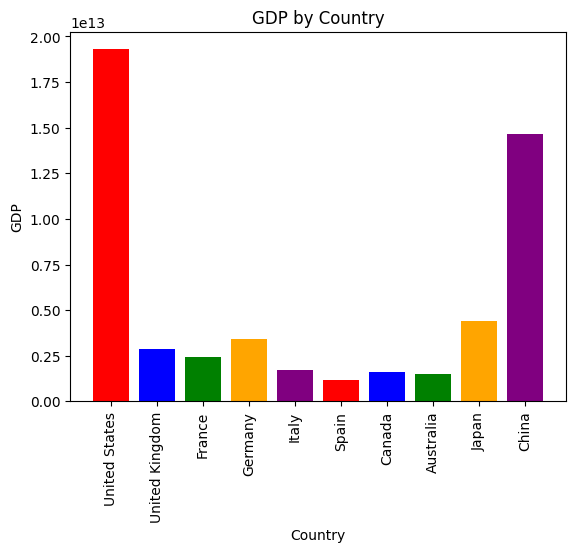
You can also ask PandasAI to generate charts for you:
df.chat(
    "Plot the histogram of countries showing for each one the gdp. Use different colors for each bar",
)
Multiple DataFrames
You can also pass in multiple dataframes to PandasAI and ask questions relating them.
import pandasai as pai
from pandasai_litellm.litellm import LiteLLM

# Initialize LiteLLM with your OpenAI model
llm = LiteLLM(model="gpt-4.1-mini", api_key="YOUR_OPENAI_API_KEY")

# Configure PandasAI to use this LLM
pai.config.set({
    "llm": llm
})

employees_data = {
    'EmployeeID': [1, 2, 3, 4, 5],
    'Name': ['John', 'Emma', 'Liam', 'Olivia', 'William'],
    'Department': ['HR', 'Sales', 'IT', 'Marketing', 'Finance']
}

salaries_data = {
    'EmployeeID': [1, 2, 3, 4, 5],
    'Salary': [5000, 6000, 4500, 7000, 5500]
}

employees_df = pai.DataFrame(employees_data)
salaries_df = pai.DataFrame(salaries_data)


pai.chat("Who gets paid the most?", employees_df, salaries_df)
Olivia gets paid the most.
Docker Sandbox
You can run PandasAI in a Docker sandbox, providing a secure, isolated environment to execute code safely and mitigate the risk of malicious attacks.
Python Requirements
pip install "pandasai-docker"
Usage
import pandasai as pai
from pandasai_docker import DockerSandbox
from pandasai_litellm.litellm import LiteLLM

# Initialize LiteLLM with your OpenAI model
llm = LiteLLM(model="gpt-4.1-mini", api_key="YOUR_OPENAI_API_KEY")

# Configure PandasAI to use this LLM
pai.config.set({
    "llm": llm
})

# Initialize the sandbox
sandbox = DockerSandbox()
sandbox.start()

employees_data = {
    'EmployeeID': [1, 2, 3, 4, 5],
    'Name': ['John', 'Emma', 'Liam', 'Olivia', 'William'],
    'Department': ['HR', 'Sales', 'IT', 'Marketing', 'Finance']
}

salaries_data = {
    'EmployeeID': [1, 2, 3, 4, 5],
    'Salary': [5000, 6000, 4500, 7000, 5500]
}

employees_df = pai.DataFrame(employees_data)
salaries_df = pai.DataFrame(salaries_data)

pai.chat("Who gets paid the most?", employees_df, salaries_df, sandbox=sandbox)

# Don't forget to stop the sandbox when done
sandbox.stop()
Olivia gets paid the most.
You can find more examples in the examples directory.
📜 License
PandasAI is available under the MIT expat license, except for the pandasai/ee directory of this repository, which has its license here.
If you are interested in managed PandasAI Cloud or self-hosted Enterprise Offering, contact us.
Resources
- Docs for comprehensive documentation
- Examples for example notebooks
- Discord for discussion with the community and PandasAI team
🤝 Contributing
Contributions are welcome! Please check the outstanding issues and feel free to open a pull request. For more information, please check out the contributing guidelines.
Thank you!
Releases
Release information has not been added yet.
Complete your AI stack
Add specialist tools for research, coding, visual content, video, and automation.





Best alternatives
Compare similar tools in the same category.



