
Pricing
Pricing information has not been added yet.
Overview
LangChain-Chatchat is an open-source RAG and agent application designed for local and offline deployment, with particular attention to Chinese-language scenarios and open-source models. Originally known as Langchain-ChatGLM, it provides a complete knowledge-base question-answering workflow built around local model serving and LangChain-style application components.
Its RAG pipeline loads documents, extracts and splits text, creates embeddings, retrieves relevant passages, and supplies them as context to an LLM. The project supports mainstream open models, embedding models, rerankers, vector databases, and deployment frameworks such as Xinference, Ollama, LocalAI, and FastChat. Newer versions also add stronger agent capabilities, hybrid retrieval approaches, multimodal interactions, and a multi-session web interface.
LangChain-Chatchat is aimed at developers and organizations that want private knowledge assistants without depending entirely on hosted APIs. It can operate with fully open-source local components while still supporting OpenAI-compatible services when desired, making it useful for internal document Q&A, private RAG systems, experimental agents, and deployments where data residency or offline operation is important.
README


📃 LangChain-Chatchat (formerly Langchain-ChatGLM)
An open-source, offline-deployable RAG and Agent application project based on large language models like ChatGLM and application frameworks like LangChain.
Contents
Overview
🤖️ A question-answering application based on local knowledge bases using the LangChain concept. The goal is to create a friendly and offline-operable knowledge base Q&A solution that supports Chinese scenarios and open-source models.
💡 Inspired by GanymedeNil's project document.ai and AlexZhangji's ChatGLM-6B Pull Request, this project aims to establish a local knowledge base Q&A application fully utilizing open-source models. The latest version uses FastChat to integrate models such as Vicuna, Alpaca, LLaMA, Koala, and RWKV, while leveraging the LangChain framework to support API calls through FastAPI or operation through a WebUI based on Streamlit.
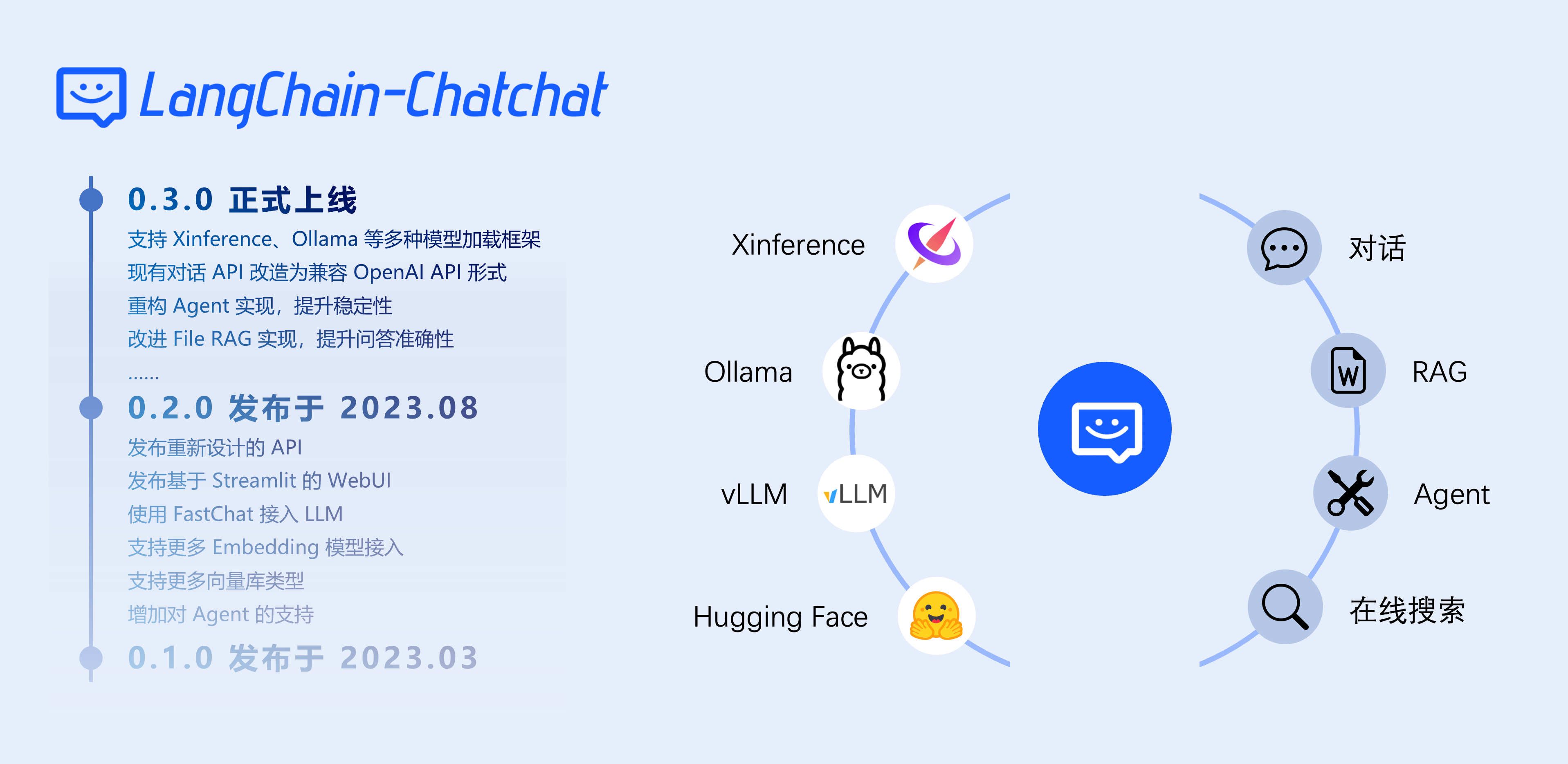
✅ This project supports mainstream open-source LLMs, embedding models, and vector databases, allowing fully open-source model offline private deployment. Additionally, the project supports OpenAI GPT API calls and continues to expand support for various models and model APIs.
⛓️ The implementation workflow includes loading files → reading text → text segmentation → text vectorization → question vectorization → matching the top k most similar text vectors with the question vector → adding the matched text as context together with the question to the prompt → submitting it to the LLM to generate an answer.

From the document processing perspective, the implementation process is as follows:

🚩 This project does not involve fine-tuning or training processes, but fine-tuned or trained models can be used to optimize project performance.
🧑💻 If you want to contribute to this project, please refer to the Developer Guide for more information about development and deployment.
What Does Langchain-Chatchat Offer
Features of Version 0.3.x
| Features | 0.2.x | 0.3.x |
|---|---|---|
| Model Integration | Local: fastchat / Online: XXXModelWorker | Local: model_provider, supporting most mainstream model loading frameworks / Online: oneapi / All model integrations are compatible with the OpenAI SDK |
| Agent | ❌ Unstable | ✅ Optimized for ChatGLM3 and Qwen, significantly enhanced Agent capabilities |
| LLM Conversations | ✅ | ✅ |
| Knowledge Base Conversations | ✅ | ✅ |
| Search Engine Conversations | ✅ | ✅ |
| File Conversations | ✅ Only vector search | ✅ Unified as File RAG, supporting BM25+KNN and other retrieval methods |
| Database Conversations | ❌ | ✅ |
| ARXIV Document Conversations | ❌ | ✅ |
| Wolfram Conversations | ❌ | ✅ |
| Text-to-Image | ❌ | ✅ |
| Local Knowledge Base Management | ✅ | ✅ |
| WEBUI | ✅ | ✅ Better multi-session support, custom system prompts, and more |
The core functionality of version 0.3.x is implemented through Agents, but users can also manually perform tool calls.
| Operation Method | Function | Applicable Scenario |
|---|---|---|
| Enable Agent and select multiple tools | Automatic tool calls by the LLM | Models with strong Agent capabilities such as ChatGLM3/Qwen or online APIs |
| Enable Agent and select one tool | LLM only parses tool parameters | Models with general Agent capabilities or when users want to manually select functions |
| Disable Agent and select one tool | Manually fill in parameters for tool calls | Models without Agent capabilities |
Supported Model Deployment Frameworks and Models
The project supports mainstream models including GLM-4-Chat and Qwen2-Instruct, along with open-source embedding models. Users start the desired model deployment framework, load their models, and configure Langchain-Chatchat to connect to them.
Supported local deployment frameworks include:
| Framework | Xinference | LocalAI | Ollama | FastChat |
|---|---|---|---|---|
| OpenAI API Compatible | ✅ | ✅ | ✅ | ✅ |
| Accelerated Inference | GPTQ, GGML, vLLM, TensorRT | GPTQ, GGML, vLLM, TensorRT | GGUF, GGML | vLLM |
| Model Types | LLM, Embedding, Rerank, Text-to-Image, Vision, Audio | LLM, Embedding, Rerank, Text-to-Image, Vision, Audio | LLM, Text-to-Image, Vision | LLM, Vision |
| Function Calling | ✅ | ✅ | ✅ | / |
| CPU / Metal Support | ✅ | ✅ | ✅ | ✅ |
| Heterogeneous Deployment | ✅ | ✅ | / | / |
| Cluster Support | ✅ | ✅ | / | / |
In addition to local model frameworks, the project supports One API for integrating online APIs such as OpenAI ChatGPT, Azure OpenAI API, Anthropic Claude, Zhipu AI, and Baichuan.
Quick Start
Installation
1. Install Langchain-Chatchat
The project supports Python 3.8–3.11 and has been tested on Windows, macOS, and Linux. Hardware support depends on the configured inference framework and can include CPU, GPU, NPU, and MPS environments.
Starting with version 0.3.0, Langchain-Chatchat can be installed as a Python package:
pip install langchain-chatchat -U
For Xinference integration:
pip install "langchain-chatchat[xinference]" -U
2. Configure a Model Inference Framework
Starting with version 0.3.0, Langchain-Chatchat no longer directly loads models from local model paths. Instead, it integrates with inference frameworks such as Xinference, Ollama, LocalAI, FastChat, and One API.
Supported model types include LLMs, embedding models, rerankers, and multimodal models.
To avoid dependency conflicts, it is recommended to place Langchain-Chatchat and model deployment frameworks such as Xinference in separate Python virtual environments.
3. Configure Langchain-Chatchat
Starting with version 0.3.0, configuration is managed through command-line tools rather than directly modifying local configuration files.
View available configuration commands:
chatchat-config --help
Available configuration groups include:
basic   Basic configuration
kb      Knowledge base configuration
model   Model configuration
server  Service configuration
View basic configuration:
chatchat-config basic --show
View model configuration options:
chatchat-config model --help
View current model configuration:
chatchat-config model --show
Change the default LLM to Qwen2-Instruct:
chatchat-config model --default_llm_model qwen2-instruct
4. Custom Model Integration
If you already have an OpenAI-compatible endpoint, it can be configured through MODEL_PLATFORMS.
Example:
chatchat-config model --set_model_platforms "[{
    \"platform_name\": \"xinference\",
    \"platform_type\": \"xinference\",
    \"api_base_url\": \"http://127.0.0.1:9997/v1\",
    \"api_key\": \"EMPT\",
    \"api_concurrencies\": 5,
    \"llm_models\": [\"autodl-tmp-glm-4-9b-chat\"],
    \"embed_models\": [\"bge-large-zh-v1.5\"],
    \"image_models\": [],
    \"reranking_models\": [],
    \"speech2text_models\": [],
    \"tts_models\": []
}]"
5. Initialize the Knowledge Base
Before initialization, make sure the model inference framework and embedding model are running and properly configured.
chatchat-kb -r
To specify an embedding model:
chatchat-kb -r --embed-model=text-embedding-3-small
6. Start the Project
chatchat -a

By default, DEFAULT_BIND_HOST is set to 127.0.0.1. To allow access through other network interfaces, change it to 0.0.0.0:
chatchat-config server --default_bind_host=0.0.0.0
Migration from Older Versions
The architecture of version 0.3.x changed significantly compared with 0.2.x, so redeployment according to the current documentation is strongly recommended.
Before migration, back up important data. Configure the new environment, configure DATA and other options, and copy the knowledge_base directory from the 0.2.x project into the configured data directory.
License
The project code is released under the Apache-2.0 license.
Project Milestones
- April 2023: Langchain-ChatGLM 0.1.0 released, supporting local knowledge-base question answering with ChatGLM-6B.
- August 2023: Langchain-ChatGLM renamed to Langchain-Chatchat. Version 0.2.0 adopted FastChat and expanded support for models and databases.
- October 2023: Langchain-Chatchat 0.2.5 introduced Agent functionality. The project won third prize in a hackathon organized by Founder Park, Zhipu AI, and Zilliz.
- December 2023: Langchain-Chatchat surpassed 20K GitHub stars.
- June 2024: Langchain-Chatchat 0.3.0 introduced a new project architecture.
Contact Us
Telegram

Project Community

🎉 Join the Langchain-Chatchat WeChat community to discuss the project with other users and contributors.
Official Account

🎉 Scan the QR code to follow the official Langchain-Chatchat public account.
Releases
Release information has not been added yet.
Complete your AI stack
Add specialist tools for research, coding, visual content, video, and automation.





Best alternatives
Compare similar tools in the same category.



