
Pricing
$0
Freemium
Overview
easy-dataset is a powerful tool for creating datasets for LLM fine-tuning 、RAG and Eval. Easy Dataset is an application specifically designed for building large language model (LLM) datasets. It features an intuitive interface, along with built-in powerful document parsing tools, intelligent segmentation algorithms, data cleaning and augmentation capabilities. The application can convert domain-specific documents in various formats into high-quality structured datasets, which are applicable to scenarios such as model fine-tuning, retrieval-augmented generation (RAG), and model performance evaluation.
A powerful tool for creating fine-tuning datasets for Large Language Models.
README







A powerful tool for creating fine-tuning datasets for Large Language Models
Features • Quick Start • Documentation • Contributing • License
If you like this project, please give it a Star⭐️, or buy the author a coffee => Donate ❤️!
Overview
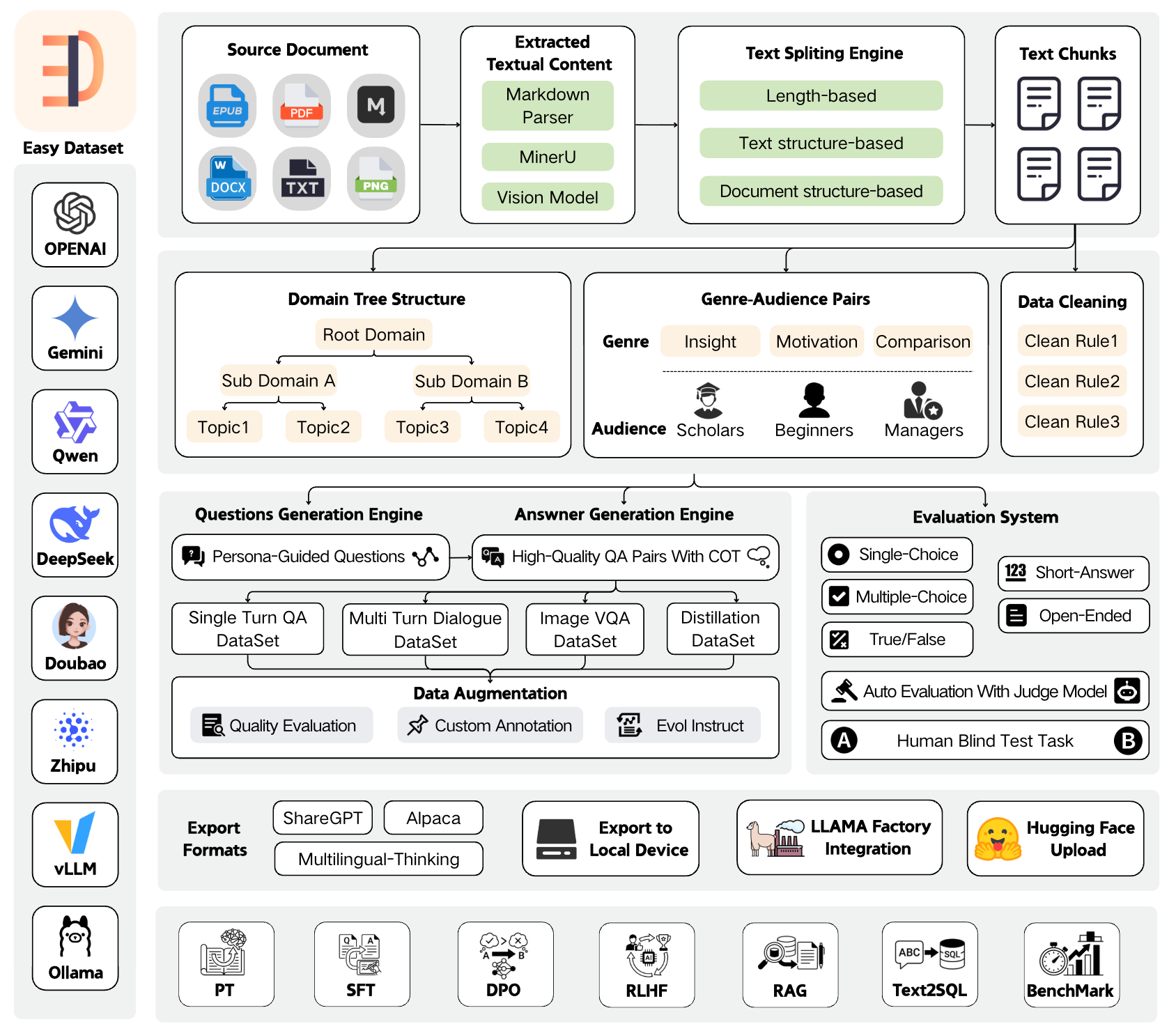
Easy Dataset is an application specifically designed for building large language model (LLM) datasets. It features an intuitive interface, along with built-in powerful document parsing tools, intelligent segmentation algorithms, data cleaning and augmentation capabilities. The application can convert domain-specific documents in various formats into high-quality structured datasets, which are applicable to scenarios such as model fine-tuning, retrieval-augmented generation (RAG), and model performance evaluation.
News
🎉🎉 Easy Dataset Version 1.7.0 launches brand-new evaluation capabilities! You can effortlessly convert domain-specific documents into evaluation datasets (test sets) and automatically run multi-dimensional evaluation tasks. Additionally, it comes with a human blind test system, enabling you to easily meet needs such as vertical domain model evaluation, post-fine-tuning model performance assessment, and RAG recall rate evaluation. Tutorial: https://www.bilibili.com/video/BV1CRrVB7Eb4/
Features
📄 Document Processing & Data Generation
- Intelligent Document Processing: Supports PDF, Markdown, DOCX, TXT, EPUB and more formats with intelligent recognition
- Intelligent Text Splitting: Multiple splitting algorithms (Markdown structure, recursive separators, fixed length, code-aware chunking), with customizable visual segmentation
- Intelligent Question Generation: Auto-extract relevant questions from text segments, with question templates and batch generation
- Domain Label Tree: Intelligently builds global domain label trees based on document structure, with auto-tagging capabilities
- Answer Generation: Uses LLM API to generate comprehensive answers and Chain of Thought (COT), with AI optimization
- Data Cleaning: Intelligent text cleaning to remove noise and improve data quality
🔄 Multiple Dataset Types
- Single-Turn QA Datasets: Standard question-answer pairs for basic fine-tuning
- Multi-Turn Dialogue Datasets: Customizable roles and scenarios for conversational format
- Image QA Datasets: Generate visual QA data from images, with multiple import methods (directory, PDF, ZIP)
- Data Distillation: Generate label trees and questions directly from domain topics without uploading documents
📊 Model Evaluation System
- Evaluation Datasets: Generate true/false, single-choice, multiple-choice, short-answer, and open-ended questions
- Automated Model Evaluation: Use Judge Model to automatically evaluate model answer quality with customizable scoring rules
- Human Blind Test (Arena): Double-blind comparison of two models' answers for unbiased evaluation
- AI Quality Assessment: Automatic quality scoring and filtering of generated datasets
🛠️ Advanced Features
- Custom Prompts: Project-level customization of all prompt templates (question generation, answer generation, data cleaning, etc.)
- GA Pair Generation: Genre-Audience pair generation to enrich data diversity
- Task Management Center: Background batch task processing with monitoring and interruption support
- Resource Monitoring Dashboard: Token consumption statistics, API call tracking, model performance analysis
- Model Testing Playground: Compare up to 3 models simultaneously
📤 Export & Integration
- Multiple Export Formats: Alpaca, ShareGPT, Multilingual-Thinking formats with JSON/JSONL file types
- Balanced Export: Configure export counts per tag for dataset balancing
- LLaMA Factory Integration: One-click LLaMA Factory configuration file generation
- Hugging Face Upload: Direct upload datasets to Hugging Face Hub
🤖 Model Support
- Wide Model Compatibility: Compatible with all LLM APIs that follow the OpenAI format
- Multi-Provider Support: OpenAI, MiniMax, Ollama (local models), Zhipu AI, Alibaba Bailian, OpenRouter, and more
- Vision Models: Support Gemini, Claude, etc. for PDF parsing and image QA
🌐 User Experience
- User-Friendly Interface: Modern, intuitive UI designed for both technical and non-technical users
- Multi-Language Support: Complete Chinese, English, Turkish and Portuguese language support 🇹🇷
- Dataset Square: Discover and explore public dataset resources
- Desktop Clients: Available for Windows, macOS, and Linux
Quick Demo
https://github.com/user-attachments/assets/6ddb1225-3d1b-4695-90cd-aa4cb01376a8
Local Run
Download Client
| Windows | MacOS | Linux | |

Setup.exe |

Intel |
M |

AppImage |
Install with NPM
- Clone the repository:
   git clone https://github.com/ConardLi/easy-dataset.git
   cd easy-dataset
- Install dependencies:
npm install
- Start the development server:
   npm run build

   npm run start
- Open your browser and visit
http://localhost:1717
Using the Official Docker Image
- Clone the repository:
git clone https://github.com/ConardLi/easy-dataset.git
cd easy-dataset
- Modify the
docker-compose.ymlfile:
services:
  easy-dataset:
    image: ghcr.io/conardli/easy-dataset
    container_name: easy-dataset
    ports:
      - '1717:1717'
    volumes:
      - ./local-db:/app/local-db
      - ./prisma:/app/prisma
    restart: unless-stopped
Note: It is recommended to use the
local-dbandprismafolders in the current code repository directory as mount paths to maintain consistency with the database paths when starting via NPM.
Note: The database file will be automatically initialized on first startup, no need to manually run
npm run db:push.
- Start with docker-compose:
docker-compose up -d
- Open a browser and visit
http://localhost:1717
Building with a Local Dockerfile
If you want to build the image yourself, use the Dockerfile in the project root directory:
- Clone the repository:
git clone https://github.com/ConardLi/easy-dataset.git
cd easy-dataset
- Build the Docker image:
docker build -t easy-dataset .
- Run the container:
docker run -d \
  -p 1717:1717 \
  -v ./local-db:/app/local-db \
  -v ./prisma:/app/prisma \
  --name easy-dataset \
  easy-dataset
Note: It is recommended to use the
local-dbandprismafolders in the current code repository directory as mount paths to maintain consistency with the database paths when starting via NPM.
Note: The database file will be automatically initialized on first startup, no need to manually run
npm run db:push.
- Open a browser and visit
http://localhost:1717
Documentation
- View the demo video of this project: Easy Dataset Demo Video
- For detailed documentation on all features and APIs, visit our Documentation Site
- View the paper of this project: Easy Dataset: A Unified and Extensible Framework for Synthesizing LLM Fine-Tuning Data from Unstructured Documents
Community Practice
- Complete test set generation and model evaluation with Easy Dataset
- Easy Dataset × LLaMA Factory: Enabling LLMs to Efficiently Learn Domain Knowledge
- Easy Dataset Practical Guide: How to Build High-Quality Datasets?
- Interpretation of Key Feature Updates in Easy Dataset
- Foundation Models Fine-tuning Datasets: Basic Knowledge Popularization
Contributing
We welcome contributions from the community! If you'd like to contribute to Easy Dataset, please follow these steps:
- Fork the repository
- Create a new branch (
git checkout -b feature/amazing-feature) - Make your changes
- Commit your changes (
git commit -m 'Add some amazing feature') - Push to the branch (
git push origin feature/amazing-feature) - Open a Pull Request (submit to the DEV branch)
Please ensure that tests are appropriately updated and adhere to the existing coding style.
Join Discussion Group & Contact the Author
https://docs.easy-dataset.com/geng-duo/lian-xi-wo-men
License
This project is licensed under the AGPL 3.0 License - see the LICENSE file for details.
Citation
If this work is helpful, please kindly cite as:
@misc{miao2025easydataset,
  title={Easy Dataset: A Unified and Extensible Framework for Synthesizing LLM Fine-Tuning Data from Unstructured Documents},
  author={Ziyang Miao and Qiyu Sun and Jingyuan Wang and Yuchen Gong and Yaowei Zheng and Shiqi Li and Richong Zhang},
  year={2025},
  eprint={2507.04009},
  archivePrefix={arXiv},
  primaryClass={cs.CL},
  url={https://arxiv.org/abs/2507.04009}
}
Star History
Releases
Release information has not been added yet.
Complete your AI stack
Add complementary AI tools for the rest of your workflow.
More recommendations will appear here as matching tools are published.
Best alternatives
Compare similar tools in the same category.




