Pricing
Pricing information has not been added yet.
Overview
MoneyPrinterTurbo is an open-source application for automatically generating short-form videos from a topic or text prompt. It combines script generation, media selection, subtitles, voice synthesis, music, and video composition into an automated pipeline, reducing the amount of manual editing needed to create social-media-style video content.
The project is intended for creators and developers who want to experiment with AI-assisted video production or build repeatable content workflows. It can integrate language models and media services to generate scripts and assemble finished videos, making it useful for rapid prototyping of short videos, faceless content, informational clips, and other template-driven publishing workflows.
README
MoneyPrinterTurbo 💸
An All-in-One AI Short Video Generator
Provide a video topic or keyword, and MoneyPrinterTurbo will generate the script, match footage, create subtitles and background music, and produce an HD short video.




English | Simplified Chinese | Japanese | Releases | Issues
Screenshots 🖥️
WebUI
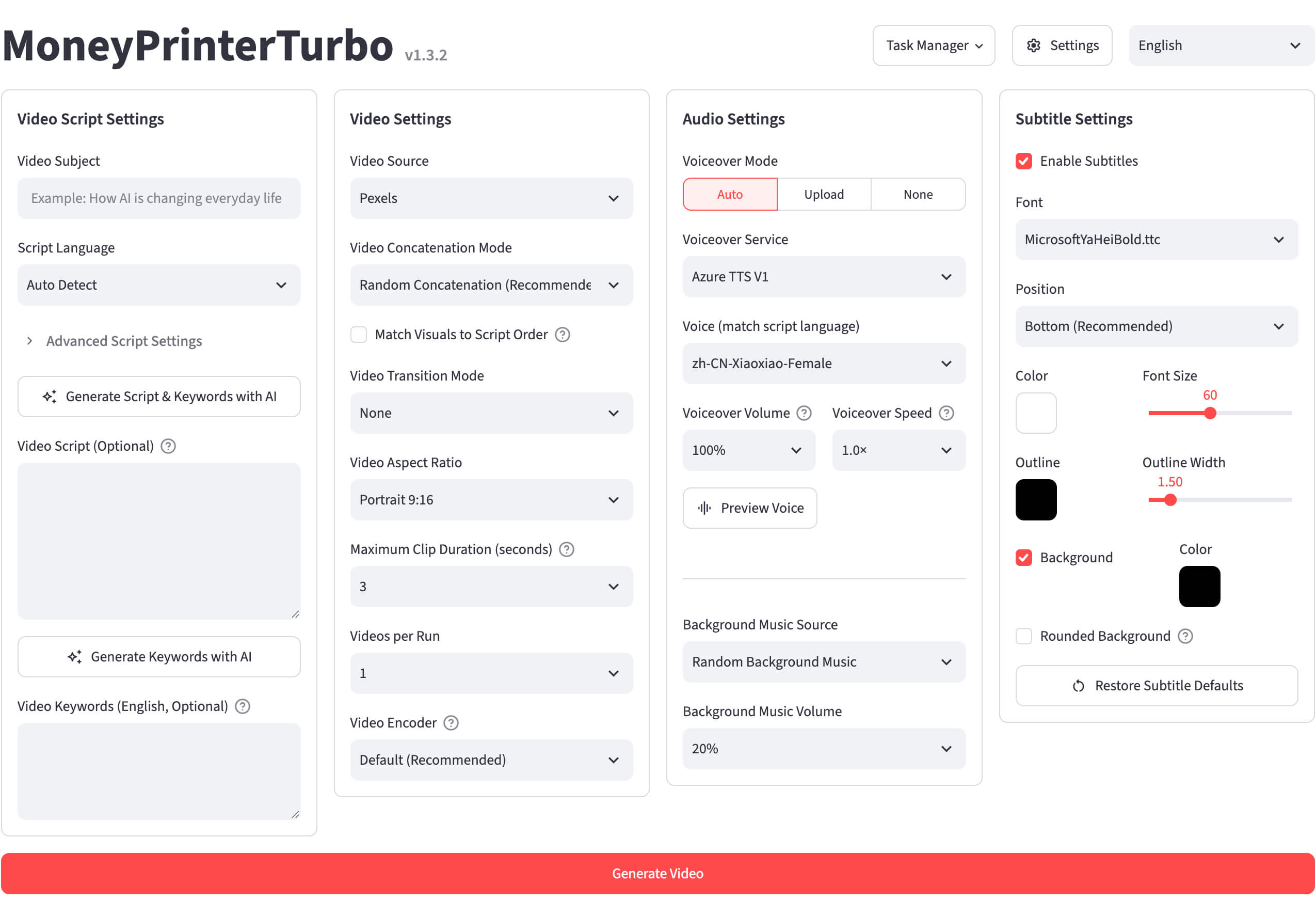
API

Features 🎯
- Provides AI Agent, WebUI, API, and CLI workflows, with code organized by controller, service, and model responsibilities
- Supports AI-generated video scripts and custom scripts
- Supports various high-definition video sizes
- Portrait 9:16,
1080x1920 - Landscape 16:9,
1920x1080
- Portrait 9:16,
- Supports batch video generation, allowing multiple videos to be created at once so users can select the best result
- Supports configurable video clip duration for controlling footage switching frequency
- Supports multilingual video script generation
- Supports Edge TTS, Azure Speech, SiliconFlow, Google Gemini, Xiaomi MiMo, ElevenLabs, and Chatterbox speech synthesis with real-time previews
- Supports subtitle generation with configurable fonts, position, color, size, outline, and background styles
- Supports random or custom background music with adjustable volume
- Supports local assets and free-to-use HD footage from Pexels, Pixabay, and Coverr
- Supports AI-generated footage through WaveSpeed AI text-to-video models, using Seedance by default
- Supports leading model providers including Kimi / Moonshot AI, OpenAI, Anthropic Claude, Google Gemini, DeepSeek, Alibaba Cloud Qwen, Microsoft Azure OpenAI, ByteDance VolcEngine Ark, xAI Grok, MiniMax, and Xiaomi MiMo
- Supports unified gateways, aggregators, and local runtimes including Cloudflare AI Gateway, Alibaba ModelScope, AIHubMix, AIML API, EvoLink, Ollama, OneAPI, LiteLLM, Groq, and Pollinations AI
- Supports one-click cross-platform publishing to TikTok, Instagram, and YouTube Shorts after video generation
- Supports exporting and importing generation settings as preset files and backing up and restoring API keys
Gallery 🎬
MoneyPrinterTurbo can generate both portrait and landscape short-form videos in multiple languages. Example projects include educational videos, science explainers, lifestyle content, technology videos, environmental topics, and storytelling content.
Supported primary output formats include:
- Portrait 9:16 at
1080x1920 - Landscape 16:9 at
1920x1080
System Requirements 📦
- Recommended platforms: Windows 10+, macOS 11+, or a mainstream Linux distribution
- Local deployment requires Python 3.11 or later; Python 3.11 is recommended
- A GPU is not required, but is recommended for faster local transcription, video processing, and batch generation
| Item | Minimum | Recommended | Optimal |
|---|---|---|---|
| CPU | 4 cores | 6 to 8 cores | 8+ cores |
| RAM | 4 GB | 8 GB | 16+ GB |
| GPU | Not required | 4+ GB VRAM | 8+ GB VRAM |
If you mainly rely on cloud LLMs, cloud TTS, and online material sources, CPU and RAM matter more than GPU. If you use faster-whisper, batch generation, or heavier local processing, a GPU can significantly improve throughput.
Quick Start 🚀
Generate Videos with an AI Agent
If your AI Agent can read Skill documents and operate a local terminal, provide it with the MoneyPrinterTurbo Skill and a video topic. The Agent can install and configure MoneyPrinterTurbo, generate the video, and return the resulting file path while requesting only API keys that are not already configured.
Use this Skill: https://raw.githubusercontent.com/harry0703/MoneyPrinterTurbo/main/docs/skill/SKILL.md
Create a video with the topic "How AI is changing everyday life."
Run in Google Colab
MoneyPrinterTurbo can also be tested through Google Colab without configuring a complete local environment.

Windows
Download the latest Windows one-click package from GitHub Releases:
https://github.com/harry0703/MoneyPrinterTurbo/releases/latest
After downloading, run update.bat to update to the latest code, then run start.bat to launch the application. The browser should open automatically.
macOS / Linux
Use the local installation or Docker deployment methods described below.
Installation & Deployment 📥
Clone the Project
git clone https://github.com/harry0703/MoneyPrinterTurbo.git
cd MoneyPrinterTurbo
On first launch, the project creates config.toml from config.example.toml. LLM providers, footage sources, API keys, and related options can be configured through the WebUI.
Docker Deployment 🐳
cd MoneyPrinterTurbo
docker compose -f docker-compose.release.yml up
The recommended docker-compose.release.yml configuration pulls the prebuilt image from GitHub Container Registry:
ghcr.io/harry0703/moneyprinterturbo:latest
To build the image locally instead:
docker compose up
Before the first start, copy config.example.toml to config.toml so it can be mounted into the containers.
Access the WebUI
http://127.0.0.1:8501
Access the API Documentation
http://127.0.0.1:8080/docs
http://127.0.0.1:8080/redoc
Manual Deployment 📦
Use uv to manage Python and project dependencies:
git clone https://github.com/harry0703/MoneyPrinterTurbo.git
cd MoneyPrinterTurbo
uv python install 3.11
uv sync --frozen
Alternatively, use venv and pip:
python3.11 -m venv .venv
source .venv/bin/activate
pip install -r requirements.txt
pyproject.toml is the primary dependency manifest, while uv.lock pins the resolved environment. requirements.txt is maintained for legacy pip-based installations.
Launch the WebUI 🌐
Windows
.\webui.bat
To allow other devices on the local network to access the WebUI:
set MPT_WEBUI_HOST=0.0.0.0
macOS or Linux
sh webui.sh
For LAN access:
MPT_WEBUI_HOST=0.0.0.0 sh webui.sh
Launch the API Service 🚀
uv run python main.py
If the virtual environment is already activated:
python main.py
CLI Mode ⌨️
MoneyPrinterTurbo can generate videos entirely from the command line without requiring a browser.
uv run python cli.py --video-subject "How AI is changing everyday life"
View all available CLI options:
uv run python cli.py --help
Voice Synthesis 🗣
The default provider is the free Edge TTS, displayed as Azure TTS V1 in the WebUI. MoneyPrinterTurbo also supports Azure TTS V2, SiliconFlow TTS, Google Gemini TTS, Xiaomi MiMo TTS, ElevenLabs TTS, self-hosted Chatterbox TTS, and a no-voice mode.
Users can select a provider and voice through the WebUI. Edge TTS does not require an API key, while Azure TTS V2 and other cloud providers require their respective credentials.
Subtitle Generation 📜
Two subtitle generation modes are available:
- edge — Uses TTS timestamps, works quickly without a GPU, and is the default mode
- whisper — Uses local
faster-whispertranscription when a more accurate subtitle timeline is required
Whisper uses the approximately 3 GB large-v3 model by default. The smaller and faster large-v3-turbo model can also be configured:
[app]
subtitle_provider = "whisper"

[whisper]
model_size = "large-v3-turbo"
The Whisper model is automatically downloaded from Hugging Face on first use. It can also be downloaded manually and placed in the project's models directory.
Background Music 🎵
Background music is stored in the project's resource/songs directory. Users can use the included tracks or provide their own music.
Subtitle Fonts 🅰
Fonts used to render video subtitles are located in resource/fonts. Custom fonts can also be added.
Cross-Platform Publishing
MoneyPrinterTurbo supports automated publishing of generated videos to TikTok, Instagram, and YouTube through Upload-Post.
Example configuration:
[app]
upload_post_enabled = true
upload_post_api_key = "your-api-key"
upload_post_username = "your-username"
upload_post_platforms = ["tiktok", "instagram", "youtube"]
upload_post_auto_upload = true
upload_post_youtube_privacy_status = "public"
After restarting the application, generated videos can automatically be published to the configured platforms. YouTube privacy can be set to public, unlisted, or private.
Feedback & Suggestions 📢
Users can submit issues or pull requests through the project's GitHub repository.
License 📝
See the project's LICENSE file for licensing information.
Star History
Releases
Release information has not been added yet.
Related articles
Guides and news that mention this tool.

Complete your AI stack
Turn generated images into videos, articles, books, voiceovers, and automated content workflows.




Best alternatives
Compare similar tools in the same category.